
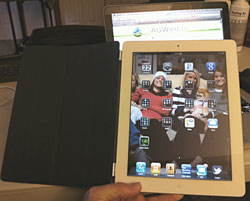
 I got the new iPad 2 yesterday and thought I’d share my first impressions. In fact I’m typing this on the new one with the WordPress app. The first comment is that thinner and lighter are an apt description. It just feels sleeker. And the first wasn’t bad. So for portability purposes this is a plus.
With iTunes, syncing all my stuff was a breeze. I had backed up my old iPad first of course. Then just plugged the sync cable in and that was that. It just doesn’t get any easier than that. I’m typing on the built in keyboard because I forgot my wireless one. But it is not as difficult as some people have made it out to be.
I have all my same apps. The ones I use the most are Mail, Twitter, The Weather Channel, Kindle, Netflix, iPod, Newspapers, USA Today, iBreviary, Maps, Safari, Google, Friendly, Contacts and Calendar but I have a lot more including 1Password, iDisk, DocsToGo, Dropbox. Apps are where it’s at!
The new iPad is a little easier to hold while sitting because it is lighter and I have to comment on the new smart cover. I’ve got a white iPad with the blue leather smart cover. This cover is cool! It attaches with magnets and knows where to fit them. It only covers the screen but that’s okay with me. I’m going to be putting this into a carry on bag or have it lying on a coffee table. I’m not worried about scratching the back. The cover turns it off when I close it automatically. Then the iPad turns on instantly when I open it! That doesn’t sound like much but its a nice user friendly feature. The cover is in panels that allow you to either swing it around to the back to read your book or fold into several configurations as a stand like I’m doing now to type. I recommend this cover!
Now let’s talk about some other improvements. Can you say cameras? Front and back and I’ve already used FaceTime with a friend. Works great. I haven’t used Skype on it yet but I’m sure that will work fine too. Having these cameras opens up a whole new world of opportunities!
Before I got it I was asked if it would have a USB port. It does not. But I had already gotten the camera kit which includes a USB adapter that worked fine on my original. That let’s me connect a Multi card reader for example to plug in compact flash cards.
I also bought the original adapter to let me plug this into a projector but still haven’t found this to be too useful. But then I really don’t use Keynote (PowerPoint) that much. I don’t use this to plug into a wide screen tv either. I have my Apple TV for that.
Finally, I have the wifi only version. I either use this where I have wifi or I have my iPhone 4 with a tethering account to create my own wifi. I saw no need to have an extra monthly bill! Does this replace my MacBook Pro? No way. Do I use it a lot? Yes. I have learned to love reading books and watching movies on it. It’s great for checking email, Twitter and Facebook. It’s a lot easier to pull out on the plane and use. I do wish they’d get rid of that rule to have all electronic devices turned off on takeoff and landing though!
So there you have it. It gets my highest recommendation. What did I do with my original? It has replaced Cindy’s Sony Reader. Now if Sony and Apple would just see eye to eye on their app . . .
Post Update: I added the photo after I got back from the coffee shop.